Editing & Saving
Editing a value
- Select a node and find the value you want to change (header fields are in the Value column).
- Double-click the cell. An edit box opens.
- Type the new value and press Enter to commit, or Esc to cancel. Clicking away also commits.
Numbers are entered in hex. Names and strings are entered as text.
Flag and enum pickers
Bitfield and enum fields get a dropdown button inside the cell:
| Field | Picker |
|---|---|
FileHeader.Characteristics, OptionalHeader.DllCharacteristics, extended DLL characteristics, Section[n].Characteristics | Checkboxes, one per flag, OR-ed together |
FileHeader.Machine, OptionalHeader.Magic, OptionalHeader.Subsystem | Radio buttons, one value |
Each toggle applies immediately. For example, to turn ASLR off, open DllCharacteristics and untick IMAGE_DLLCHARACTERISTICS_DYNAMIC_BASE.
Windows screenshot: The DllCharacteristics flag picker: one checkbox per flag, with the set flags ticked
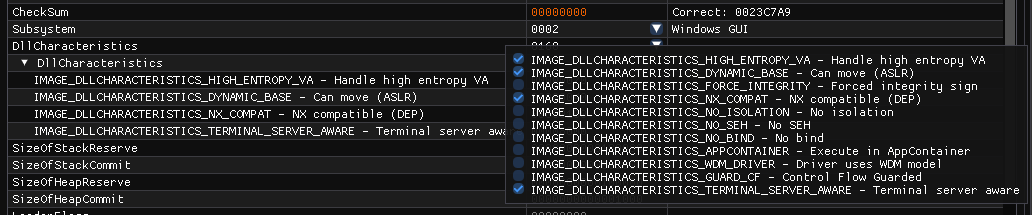
The picker lists every flag with its meaning and ticks the ones that are set (here 8160: high-entropy VA, ASLR, DEP and terminal-server aware). The expanded rows on the left show the same flags read-only.
Length limits
Text is rewritten in place, so a name or string can't grow past its original storage. The edit box warns as soon as the text you're typing is longer than the space available, and an over-length value is refused. The CLI --set applies the same rule.
Saving
- Edited bytes are highlighted in the hex view, and File → Save becomes available.
- File → Save or Ctrl+S writes back to the original file. Save As… (Ctrl+Shift+S) writes a new file and leaves the original untouched.
- Closing a tab or exiting with unsaved edits prompts Save changes to file?
Signatures and checksums
PPEE writes exactly what you changed. It does not recompute OptionalHeader.CheckSum (the CLI can: --set OptionalHeader.CheckSum=auto), and any change breaks an Authenticode signature. Re-sign the file if you need a valid signature.
Automating the same edit
Every GUI edit has a CLI equivalent:
See Editing with --set for the full address syntax, including list-view cells.
References
- Microsoft PE format specification, optional header fields: the fields you can edit, including CheckSum.
- SignTool (Microsoft): signs a file again after an edit, and verifies signatures.