Installation
PPEE is portable: it has no installer, needs no runtime (no .NET, no VC++ redistributable) and does not write to the registry unless you enable shell integration. Settings and the similarity database are stored next to the executable.
Requirements: Windows XP SP3 or later (Vista, 7, 8.x, 10, 11, Server 2003+). 32- and 64-bit Windows are both supported.
- Download the PPEE archive from mzrst.com.
- Extract it to a folder you can write to, for example
C:\Tools\ppee\. AvoidC:\Program Files, because PPEE saves its settings next to the executable. - Run
ppee.exe.
Windows screenshot: extracted folder
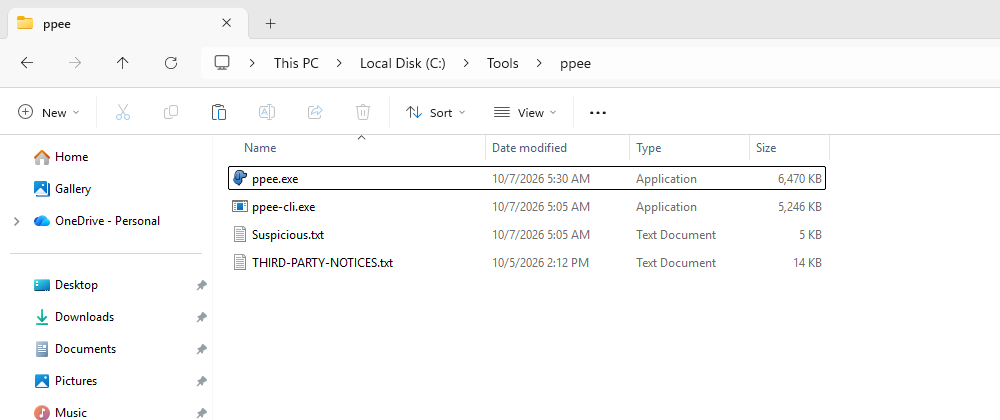
Add the CLI to PATH (optional) so ppee-cli works from any terminal:
# PowerShell, current user
[Environment]::SetEnvironmentVariable("Path", $env:Path + ";C:\Tools\ppee", "User")
Optionally enable Settings → Shell Integration to get Open in PPEE (puppy) on the right-click menu of EXE, DLL, OCX and CPL files. See Shell Integration.
Requirements: x86-64 Linux with glibc 2.38 or later (Ubuntu 24.04, Debian 13, Fedora 39, RHEL 10 and newer). The GUI also needs X11 or Wayland (XWayland) with OpenGL 3.
mkdir -p ~/.local/opt/ppee && cd ~/.local/opt/ppee
# copy ppee, ppee-cli and Suspicious.txt here, then:
chmod +x ppee ppee-cli
ln -s ~/.local/opt/ppee/ppee-cli ~/.local/bin/ppee-cli
ln -s ~/.local/opt/ppee/ppee     ~/.local/bin/ppee
Settings → Shell Integration installs a per-user .desktop entry, so file managers offer Open With PPEE. No root is needed.
Wrap the Linux ppee-cli in an image with a four-line Dockerfile (see the Docker guide):
Files in the distribution
| File | Purpose |
|---|---|
ppee / ppee.exe | GUI |
ppee-cli / ppee-cli.exe | CLI, JSON exporter and MCP server |
THIRD-PARTY-NOTICES.txt | Licence notices for the libraries and formats PPEE bundles or follows. Ships next to every binary (and in the Docker image); keep it with redistributed copies |
Suspicious.txt | Keyword list for suspicious strings. Keep it next to the executables |
ppee.ini | Created on first run: GUI settings |
<exe>.similarity.db | Created when the similarity engine runs |
Verify the installation
$ ppee-cli --version
ppee-cli 2.0.0

$ ppee-cli --help
usage: ppee-cli [options] <pe-file>
       ppee-cli --mcp [--mcp-allow-write]
  -h, --help             show this help and exit
  ...
Update notifications
On Windows the GUI and CLI check once at startup whether a newer version exists. Turn this off with --no-update-check or in Settings → General. The MCP server never checks.
Next: Quick Start →