Headers & Sections
flowchart LR
    DOS[DOS header<br/>MZ, e_lfanew] --> Stub[DOS stub<br/>+ Rich header] --> NT[NT signature<br/>PE\0\0] --> FH[File header] --> OH[Optional header] --> DD[16 data<br/>directories] --> SH[Section table] --> Data[Section data…] --> Ov[Overlay]
DOS header
The first 64 bytes of the file. Only two fields matter to modern loaders: e_magic (5A4D, "MZ") and e_lfanew, the file offset of the NT headers. Unusual e_lfanew values and data hidden in the DOS stub are common tricks in crafted files.
File header
| Field | Meaning | Common values |
|---|---|---|
Machine | Target CPU | 14C x86, 8664 x64, AA64 ARM64, 1C4 ARMNT |
NumberOfSections | Entries in the section table | |
TimeDateStamp | Link time (Unix epoch), or a hash in reproducible builds | |
SizeOfOptionalHeader | E0 (PE32) / F0 (PE32+) | |
Characteristics | Flags: 0002 executable, 0020 large-address-aware, 2000 DLL, … |
In the GUI, Machine and Characteristics have flag pickers.
Optional header
| Field | Why it matters |
|---|---|
Magic | 10B = PE32, 20B = PE32+ (64-bit) |
AddressOfEntryPoint | RVA where execution starts. An entry point outside .text or in the last section is a classic packer sign |
ImageBase | Preferred load address |
SectionAlignment / FileAlignment | Memory and file alignment |
SizeOfImage / SizeOfHeaders | Mapped size |
CheckSum | Required for drivers; PPEE shows it but doesn't recompute it |
Subsystem | 2 GUI, 3 console, 1 native (drivers), A EFI application, … |
DllCharacteristics | Security hardening flags (below) |
Hardening flags
OptionalHeader.DllCharacteristics bits:
| Bit | Flag | Meaning |
|---|---|---|
0020 | HIGH_ENTROPY_VA | 64-bit ASLR |
0040 | DYNAMIC_BASE | ASLR |
0080 | FORCE_INTEGRITY | Signature required to load |
0100 | NX_COMPAT | DEP |
0200 | NO_ISOLATION | No manifest isolation |
0400 | NO_SEH | No SEH handlers |
1000 | APPCONTAINER | Must run in an AppContainer |
2000 | WDM_DRIVER | WDM driver |
4000 | GUARD_CF | Control Flow Guard |
8000 | TERMINAL_SERVER_AWARE |
Windows screenshot: Optional header of a NativeAOT ransomware with DllCharacteristics decoded into its flags
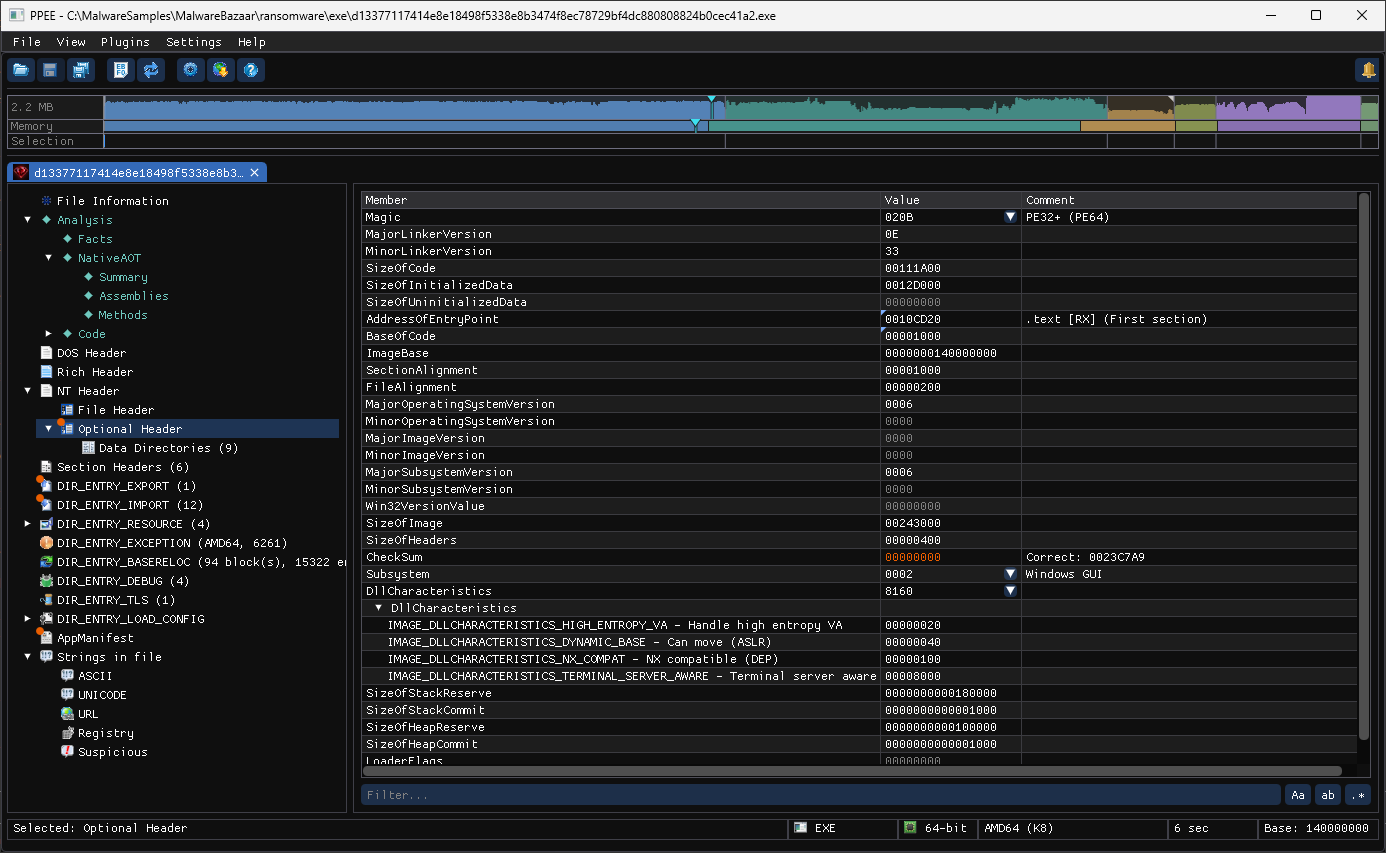
In the GUI, DllCharacteristics expands into the flags that are set. This NativeAOT ransomware (d1337711….exe) has ASLR, high-entropy VA and DEP, but not GUARD_CF. Its CheckSum is 0 and shown in the error color, with the correct value in Comment.
Check them from a script with the jq helpers, or enforce them in CI with a policy gate.
Data directories
The 16 DataDirectory[i] entries (RVA + size) point to the structures described on the other feature pages:
| i | Directory | Page |
|---|---|---|
| 0 | Export | Exports |
| 1 | Import | Imports |
| 2 | Resource | Resources |
| 3 | Exception | Exceptions |
| 4 | Security (file offset, not RVA) | Authenticode |
| 5 | Base relocation | Relocations |
| 6 | Debug | Debug |
| 7 | Architecture | reserved |
| 8 | Global pointer | |
| 9 | TLS | TLS |
| 10 | Load config | Load Config |
| 11 | Bound import | Bound imports |
| 12 | IAT | Import address table |
| 13 | Delay import | Delay-load |
| 14 | COM descriptor (.NET) | .NET |
| 15 | Reserved |
Section headers
Layout problems are flagged in the GUI
In Section Headers, the VirtualAddress of a section is marked when it starts inside the headers (error), is not in ascending order (warning), or overlaps another section in memory (error). The PE/COFF specification requires ascending, non-overlapping sections that begin after the headers, so a violation usually means a crafted or damaged file. RVAs that fall below the first section are labelled Inside header area wherever a section name is shown.
Each section has a name, virtual address and size, raw pointer and size, and Characteristics:
| Flag | Meaning |
|---|---|
00000020 | Contains code |
00000040 | Initialized data |
00000080 | Uninitialized data |
02000000 | Discardable |
20000000 | Execute |
40000000 | Read |
80000000 | Write |
.text is typically 60000020 (code, RX). Warning signs: a section that is both writable and executable (E00000xx), raw size 0 with a large virtual size (unpacked at run time), or non-standard names (UPX0, .vmp0). The navigator strip flags these visually.
Windows screenshot: Section headers of a UPX-packed sample: UPX0 has no raw data and is writable and executable
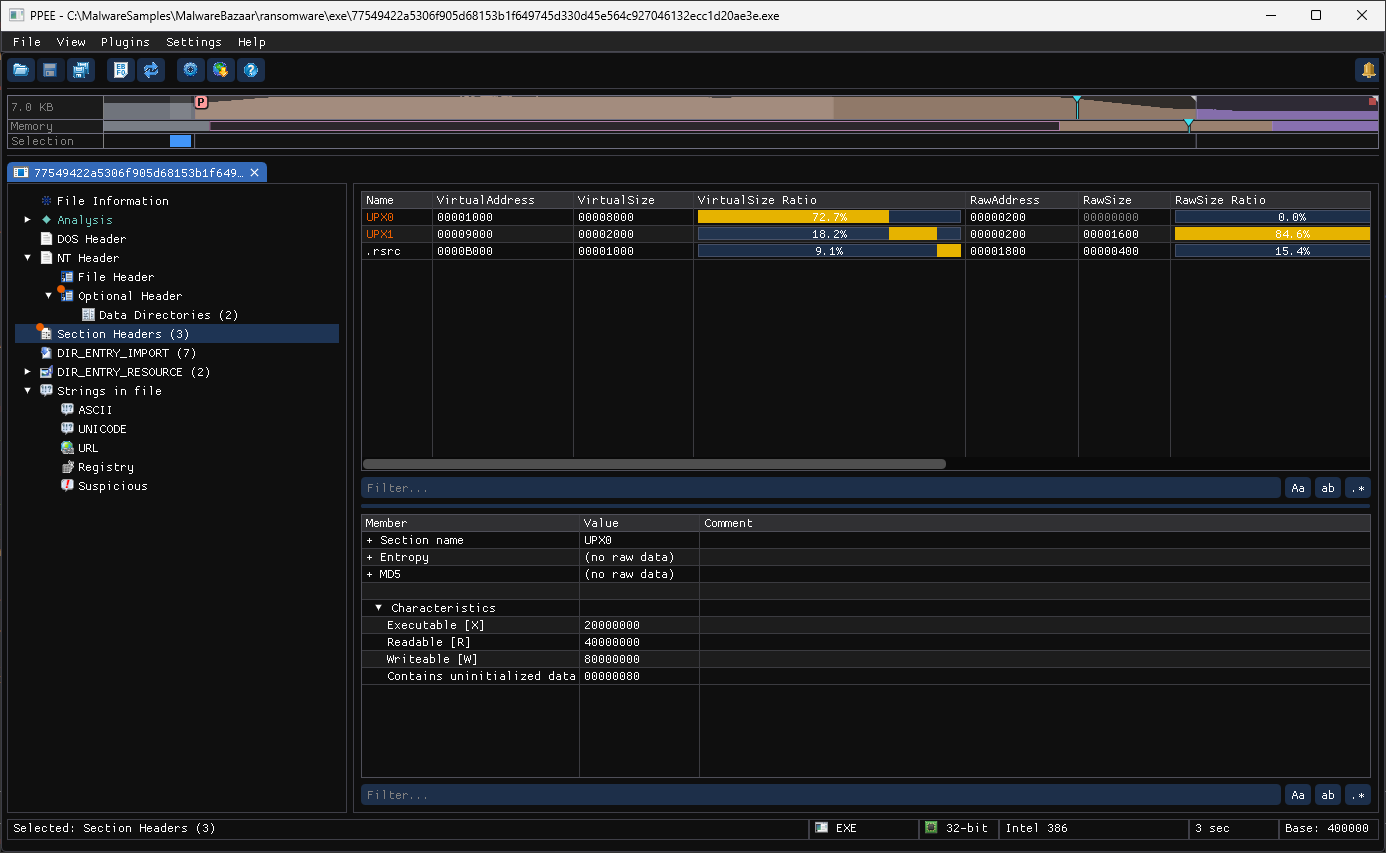
A UPX-packed ransomware dropper (77549422….exe) shows all three signs at once. UPX0 takes 72.7 % of the image in memory but 0 bytes in the file (RawSize 00000000, marked), so it is filled at run time. Its Characteristics decode to Executable, Readable and Writeable, and the non-standard names are in the warning color. The Ratio bars compare each section's share of memory with its share of the file.
Long names: /4, /29, …
A section name has 8 bytes. A longer one (MinGW, Go and Rust GNU builds keep their DWARF sections, .debug_info, .debug_line, …) is stored in the COFF string table, and the header holds / and its offset there: /29. PPEE shows the real name everywhere a section is named (the GUI, --sections as /29 (.debug_info), sectionName in strings, and every MCP tool, with the header's own text as rawName in triage_pe). Both forms work where a section is asked for by name: section:.debug_info or section:/29 in decode_bytes and hash_range, and file.dll#section:.debug_info as a layer.
List section names:
ppee-cli --json --sections f.exe | jq -r '.sections | to_entries[] | select(.key|endswith(".Name")) | .value'
For a long name, --json adds Section[i].LongName next to Section[i].Name ("/29" and ".debug_info").
Related CLI: --headers · --dirs · --sections · --set
References
- Microsoft PE format specification: the official definition of every header field described here.
- Microsoft PE format specification, section flags: the meaning of each section characteristic bit.
- Microsoft PE format specification, DLL characteristics: the ASLR, DEP, CFG and other security flags in the optional header.