Security Directory (Authenticode)
Data directory 4
IMAGE_DIRECTORY_ENTRY_SECURITY: DataDirectory[4] in the Optional header. All data directories
The security directory holds the file's Authenticode signatures. Signatures are a trust signal that attackers work hard to fake: they self-sign, steal or buy certificates, and graft valid signatures onto modified files. PPEE parses every signature on every platform, without calling any OS APIs, so you can triage signatures in a Linux sandbox or a CI container.
How the structure works
A file offset, not an RVA
Unlike every other data directory, DataDirectory[4].VirtualAddress is a file offset. The certificate table isn't mapped into memory; it normally sits at the very end of the file.
Certificate table (at DataDirectory[4] file offset)
└── WIN_CERTIFICATE  (dwLength, wRevision 0x0200, wCertificateType 0x0002 = PKCS#7)
    └── PKCS#7 SignedData
        ├── SpcIndirectDataContent  → digest algorithm + the image's Authenticode hash ("embedded digest")
        ├── SignerInfo              → program name, publisher link, signature
        ├── certificates            → signer certificate + chain
        ├── counter-signature / RFC 3161 token → timestamp
        └── nested signature(s)     → e.g. a SHA-256 signature inside a SHA-1 one (dual signing)
The Authentihash is a hash of the image that skips CheckSum, the security directory entry and the certificate table itself. Signing stores it as the embedded digest, so recomputing it tells you whether the signed bytes were modified.
What PPEE shows
Linux screenshot: Security view
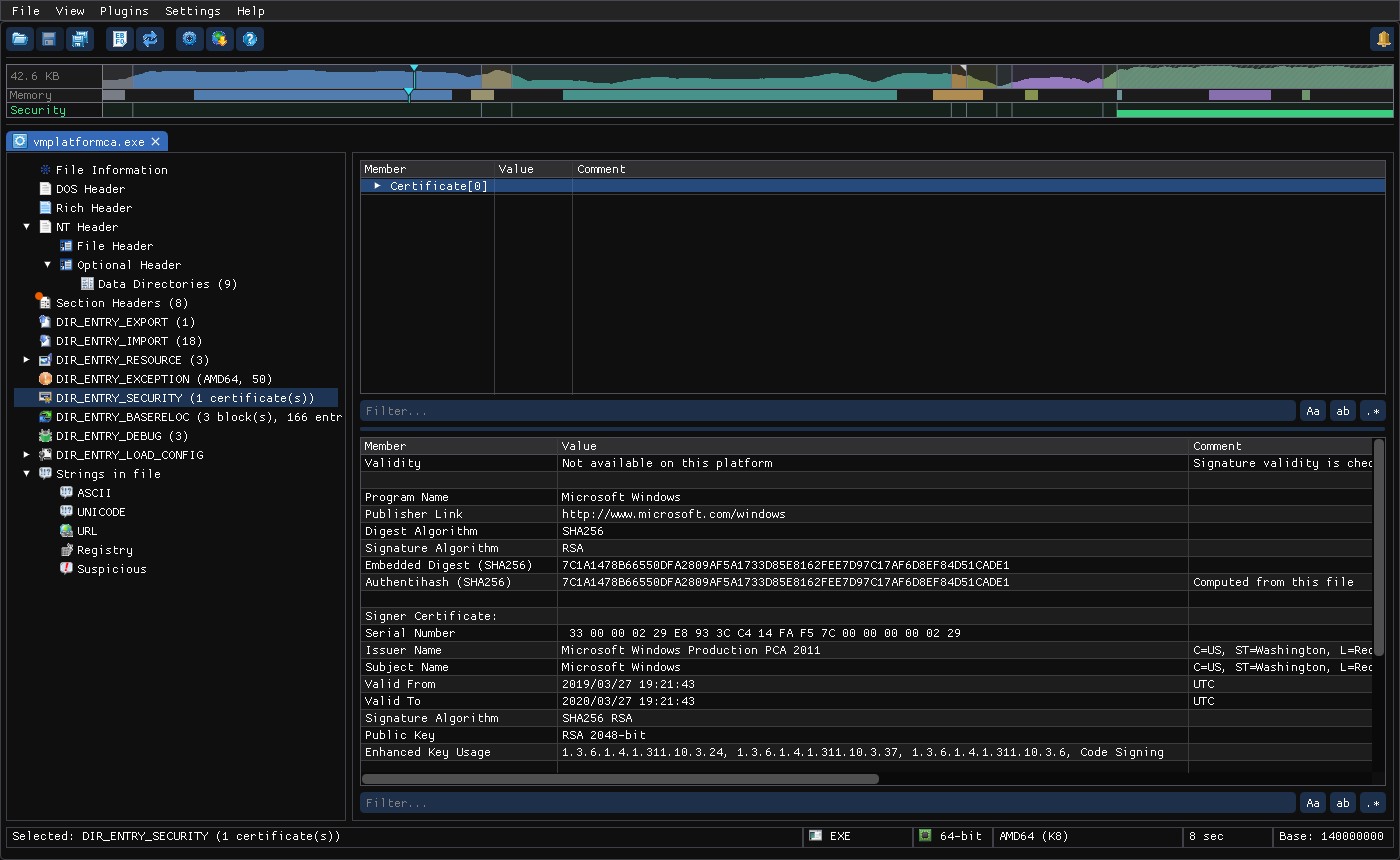
| Item | Meaning |
|---|---|
| Certificate entries | File offset, length, revision, type and SHA-256 of each WIN_CERTIFICATE |
| Validity | WinVerifyTrust verdict (Windows builds; see below) |
| Program name / publisher link | From the signer's SpcSpOpusInfo attribute |
| Digest / signature algorithm | For example SHA1 or SHA256, and RSA |
| Embedded digest vs Authentihash (computed from this file) | Equal: intact. Different: modified after signing. In the GUI both rows turn to the warning color, the comment reads does not match the embedded digest, and the tree node gets a warning dot |
| Signer certificate | Serial number, issuer, subject, signature algorithm, public key size, Enhanced Key Usage, and the validity period (UTC). Valid From / Valid To also say how many days ago or remaining, and are highlighted when the certificate is not yet valid or has expired |
| Timestamp | Kind (RFC3161 token or legacy PKCS#9 counter-signature), time, TSA certificate |
| Nested signatures | Each nested signature separately (nested: true) |
Linux screenshot: A signed file whose digest no longer matches: both digests and the expired Valid To are highlighted
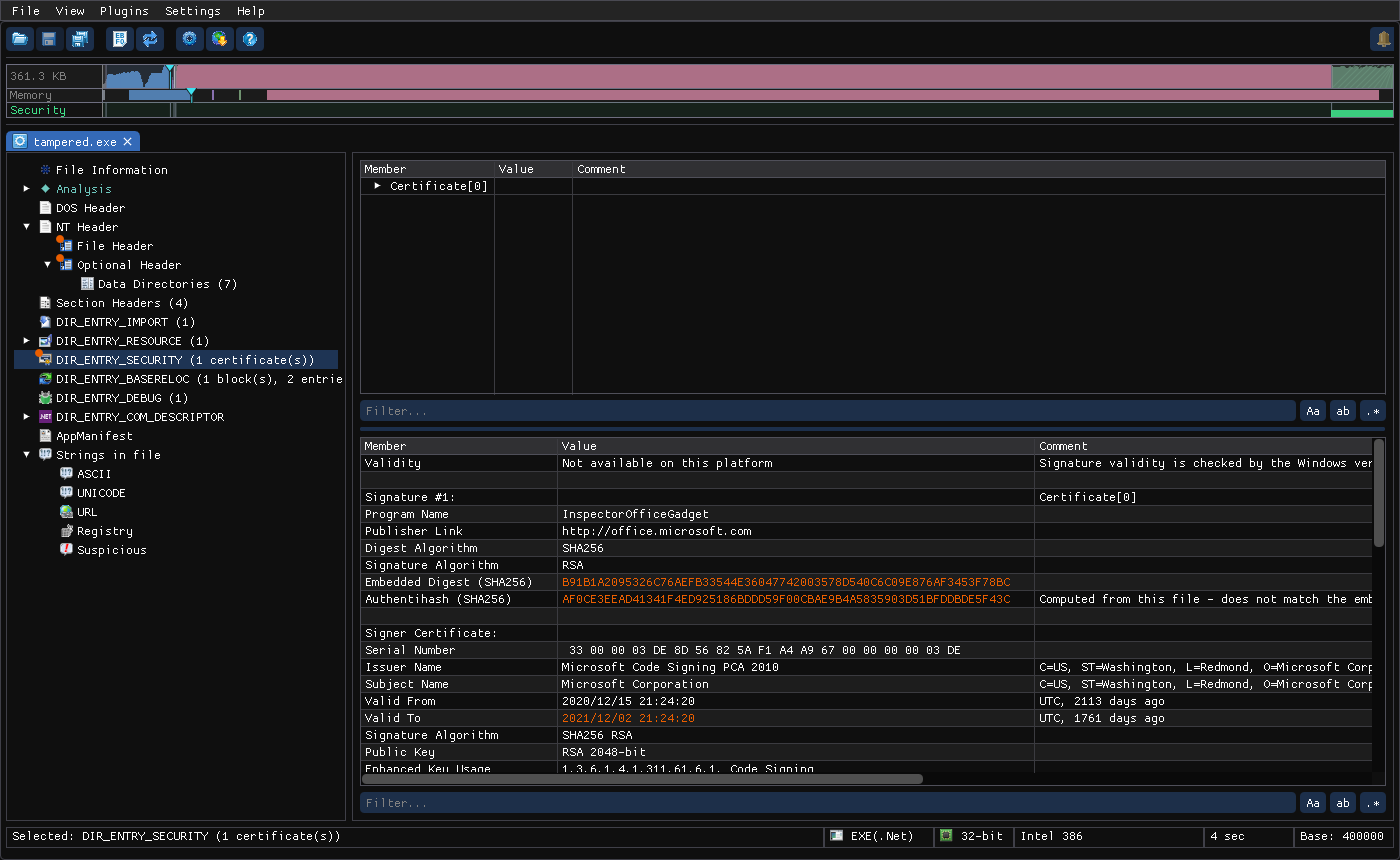
The screenshot shows a Microsoft-signed sample whose embedded digest and computed Authentihash differ (highlighted, with the comment), and a signer certificate that expired 1761 days ago. An expired certificate isn't suspicious by itself when the signature has a trusted timestamp, but a digest mismatch always is.
The directory entry itself is also checked: a Security table whose offset or end lies beyond the end of the file, or that isn't 8-byte aligned, is highlighted in the Data Directories list.
Validity on Windows
| Result | Meaning |
|---|---|
SIGNED & VERIFIED | Valid signature, trusted chain |
Not signed | No signature |
Signature present but not trusted | For example a self-signed or untrusted root |
Signature present but disallowed | Explicitly distrusted (revoked or blocklisted) |
Disabled by admin policy | Blocked by local policy |
Broken | Hash mismatch or corrupt signature |
Windows screenshot: validity result
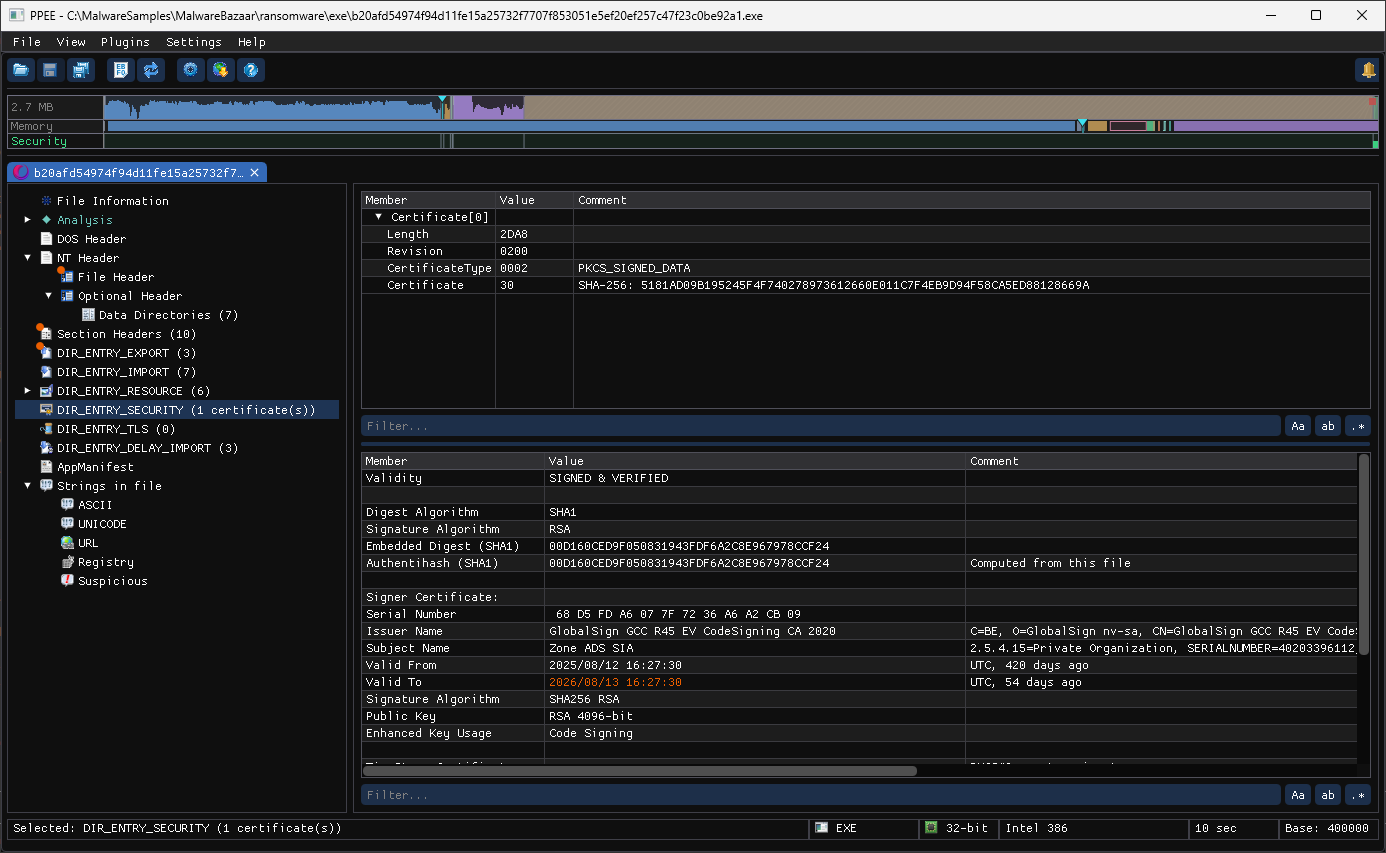
On Linux and in Docker, validity reads Not available on this platform. Integrity (embedded digest vs Authentihash), signer, chain and timestamp details are identical on every platform.
Reading signatures like an analyst
| Observation | What it suggests |
|---|---|
| Subject = Issuer, no chain to a public CA | Self-signed: gives the look of a signature with none of the trust |
| No timestamp | The signature becomes untrusted once the certificate expires; also typical of throw-away certs |
| SHA-1 digest only, on a recent file | Weak or legacy signing, unusual for modern legitimate software |
| Embedded digest ≠ Authentihash | Code or data was modified after signing: trojanized software, or a stolen signature grafted onto another file |
| A valid signature from a small company, EV cert issued weeks before the sample appeared | Possibly a bought or stolen certificate. Valid doesn't mean benign |
Signer doesn't match RT_VERSION CompanyName | Masquerading (see Resources) |
| Data after the certificate table, or a table that doesn't end at end-of-file | Appended payload or a padded signature. Compare with the file size (recipe below) |
Real samples
| Sample | What PPEE shows | Verdict |
|---|---|---|
RemusStealer (847d8f49….exe) | Subject = issuer jaweralima.com, ST=bId7Hmyw, L=IsolE, O=421ZtfNiHkua2p (random), EKU TLS server/client auth only, SHA1, no timestamp | Throw-away self-signed cert; the digest matches, so the file is intact but not trusted |
A dropper (malware-security.exe) | Subject tycsports.com, issuer tycsports.com, SHA1, no timestamp, valid 2026-06-19 → 2027-06-19 | Self-signed, impersonating a domain |
Trojanized PuTTY (4179ed7d….exe) | Signer Simon Tatham via COMODO RSA Code Signing CA, dual SHA-1 + SHA-256, PKCS#9 timestamps, both digests ≠ Authentihash | Genuine signature, modified binary |
"InspectorOfficeGadget" (7902e87a….exe) | Signer Microsoft Corporation, RFC 3161 timestamp, embedded digest ≠ Authentihash; the certificate table ends exactly at end-of-file | Microsoft signature on altered signed bytes |
A recent sample (6451eb28….exe) | KALIM LIMITED via GlobalSign GCC R45 EV CodeSigning CA 2020, intact, timestamped | Cryptographically valid EV signature; judge the file by its behavior, not the signature |
CLI and JSON
$ ppee-cli --security 847d8f49….exe
Security (certificate table): 1 entrie(s)
  offset=2DB000 length=2432 revision=0200 type=0002 sha256=417C5AC0038A8E7912703191B4F4B9F25D6FB2E6652E27045E944FF80351EB8E
  Validity: Not available on this platform -- Signature validity is checked by the Windows version of ppee
  Signature #1 (certificate[0])
    Digest Algorithm: SHA1
    Embedded Digest (SHA1): 92522BB8270AC121C54FF11FCAD37AE131B3AF61
    Authentihash (SHA1): 92522BB8270AC121C54FF11FCAD37AE131B3AF61
    Signer Certificate:
      Issuer Name: jaweralima.com (C=US, ST=bId7Hmyw, L=IsolE, O=421ZtfNiHkua2p, CN=jaweralima.com)
      Subject Name: jaweralima.com (C=US, ST=bId7Hmyw, L=IsolE, O=421ZtfNiHkua2p, CN=jaweralima.com)
      Valid: 2026/08/05 07:25:56 - 2027/08/05 07:25:56 UTC
      Enhanced Key Usage: 1.3.6.1.5.5.7.3.1, 1.3.6.1.5.5.7.3.2
PS C:\> ppee-cli.exe --security C:\MalwareSamples\847d8f4998d22fde37eb76f99b6d91012c42965b741fe2cec453ca5876cdf147.exe
C:\MalwareSamples\847d8f4998d22fde37eb76f99b6d91012c42965b741fe2cec453ca5876cdf147.exe: 2996608 bytes, PE32+

Security (certificate table): 1 entrie(s)
  offset=2DB000 length=2432 revision=0200 type=0002 sha256=417C5AC0038A8E7912703191B4F4B9F25D6FB2E6652E27045E944FF80351EB8E
  Validity: Broken
  Signature #1 (certificate[0])
    Digest Algorithm: SHA1
    Signature Algorithm: RSA
    Embedded Digest (SHA1): 92522BB8270AC121C54FF11FCAD37AE131B3AF61
    Authentihash (SHA1): 92522BB8270AC121C54FF11FCAD37AE131B3AF61
    Signer Certificate:
      Serial Number:  24 31 0E CA B7 5B FF EA
      Issuer Name: jaweralima.com (C=US, ST=bId7Hmyw, L=IsolE, O=421ZtfNiHkua2p, CN=jaweralima.com)
      Subject Name: jaweralima.com (C=US, ST=bId7Hmyw, L=IsolE, O=421ZtfNiHkua2p, CN=jaweralima.com)
      Valid: 2026/08/05 07:25:56 - 2027/08/05 07:25:56 UTC
      Signature Algorithm: SHA256 RSA
      Public Key: RSA 4096-bit
      Enhanced Key Usage: 1.3.6.1.5.5.7.3.1, 1.3.6.1.5.5.7.3.2
Read it against the table above: digests equal (intact), issuer = subject (self-signed), random place names, TLS EKUs instead of code signing (1.3.6.1.5.5.7.3.3), no TimeStamp line. On Windows, validity reports Signature present but not trusted.
JSON: security → present, certificates[] (fileOffset, length, revision, certificateType, sha256), validity (available, result, comment), signatures[] (nested, programName, digestAlgorithm, embeddedDigest, authentihash, signerCertificate{…}, timestamp{kind, date, certificate}).
Hunting recipes
# One-line verdict per signature
ppee-cli --json --security f.exe | jq -r '.security.signatures[] | [
  (if .embeddedDigest == .authentihash then "INTACT" else "MODIFIED" end),
  (if .signerCertificate.subjectName == .signerCertificate.issuerName then "SELF-SIGNED" else "CA" end),
  .digestAlgorithm, (.timestamp.kind // "NO-TIMESTAMP"), .signerCertificate.subjectName] | @tsv'

# Tampered signed files in a folder
for f in samples/*; do
  ppee-cli --no-similarity --json --security "$f" 2>/dev/null | jq -r --arg f "$f" \
    'select(.security.present) | select([.security.signatures[] | .embeddedDigest != .authentihash] | any) | "MODIFIED\t\($f)"'
done

# Group a sample set by signer (spot a certificate used across a campaign)
for f in samples/*; do ppee-cli --no-similarity --json --security "$f" 2>/dev/null \
  | jq -r '.security.signatures[0].signerCertificate | "\(.serialNumber)\t\(.subjectName)"'; done | sort | uniq -c | sort -rn

# Anything after the certificate table?
f=sample.exe; ppee-cli --json --security "$f" | jq --argjson size "$(stat -c %s "$f")" \
  '.security.certificates[-1] as $c | def h: ascii_downcase | explode | reduce .[] as $x (0; . * 16 + (if $x >= 97 then $x - 87 else $x - 48 end));
   {tableEnd: (($c.fileOffset | h) + $c.length), fileSize: $size, trailingBytes: ($size - (($c.fileOffset | h) + $c.length))}'
Expired certificates
A signature made while the certificate was valid, with a trusted timestamp, stays valid after the certificate expires. Without a timestamp, trust ends when the certificate does.
MCP: check_signature · Related: --security · CI: require a signature · Authentihash
References
- Microsoft PE format specification, attribute certificate table: the layout of the certificate table this page reads.
- Authenticode signing overview (Microsoft): how signatures and timestamps are produced and verified.
- SignTool (Microsoft): signs a file again after an edit, and verifies signatures.
- Get-AuthenticodeSignature (Microsoft PowerShell): Windows' own signature check, for comparison in scripts.