Import Directory
Data directory 1
IMAGE_DIRECTORY_ENTRY_IMPORT: DataDirectory[1] in the Optional header. All data directories
The import directory tells the Windows loader which DLLs to map and which functions to resolve before the program starts. For an analyst it is usually the fastest static answer to "what can this binary do?". It is also one of the first structures packers and loaders tamper with.
How the structure works
flowchart LR
    DD["DataDirectory[1]"] --> D1["IMAGE_IMPORT_DESCRIPTOR<br/>kernel32.dll"]
    DD --> D2["IMAGE_IMPORT_DESCRIPTOR<br/>ws2_32.dll"]
    DD --> D0["all-zero terminator"]
    D1 -- OriginalFirstThunk --> INT["Import Name Table<br/>hint + name / ordinal<br/>(never changes)"]
    D1 -- FirstThunk --> IAT["Import Address Table<br/>overwritten by the loader<br/>with real addresses"]
D1 -- Name --> N["'kernel32.dll'"]| Field | Meaning |
|---|---|
| Name | RVA of the DLL name string |
| OriginalFirstThunk (OFT) | RVA of the Import Name Table: one entry per function, either a hint/name RVA or an ordinal (high bit set) |
| FirstThunk (FT) | RVA of the Import Address Table slots. On disk they normally mirror the OFT; after loading they hold the resolved addresses |
| TimeDateStamp | 0 normally; FFFFFFFF when the image is bound |
| ForwarderChain | Legacy binding field, normally 0 or FFFFFFFF |
The hint is an index into the exporting DLL's name table, a lookup speed-up. The loader falls back to a name search when it's wrong.
What PPEE shows
Linux screenshot: Import view: modules above, functions below
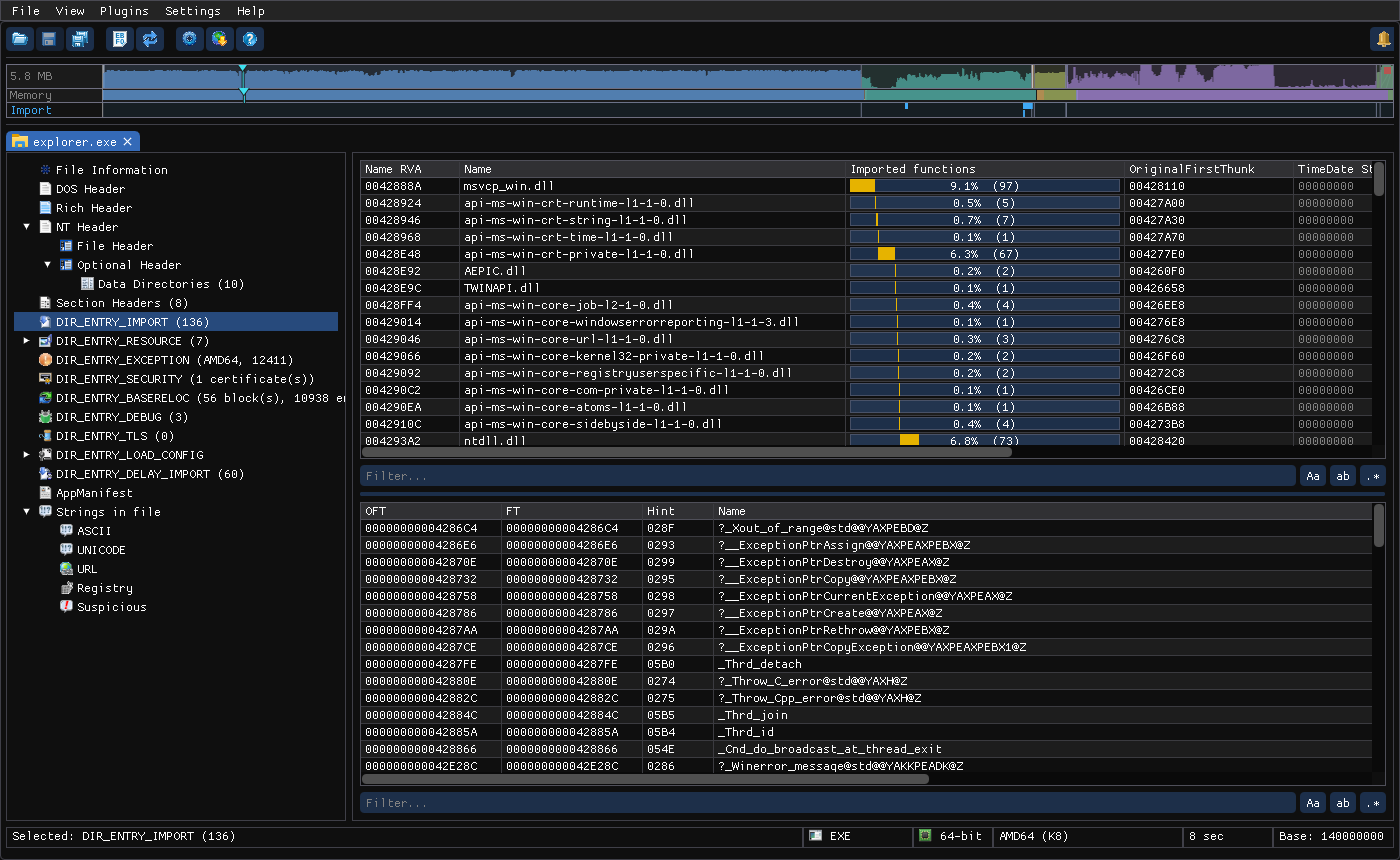
Upper list (one row per DLL): Name RVA · Name · Imported functions (count, with a bar showing its share of all imports) · OriginalFirstThunk · TimeDate Stamp · ForwarderChain · FirstThunk · Description (read from file).
Lower list (functions of the selected DLL): OFT · FT · Hint · Name · Demangled name (C++ symbols such as ?_Xout_of_range@std@@YAXPEBD@Z are shown readable) · Ordinal.
Windows only: modules not found on disk
On Windows, PPEE looks each imported DLL up in the System and Windows directories. A module that isn't found there is shown in the warning color. When it is found, its FileDescription fills the Description column. A non-system DLL name among system ones is often the sideloading dependency you're looking for. Invalid (non-printable) module names are flagged too.
- Call sites column (x86/x64): how many instructions in the code call or read each function's IAT slot, filled in by the background code scan.
0means imported but never called directly: common in packers, which call through registers. Click the corner mark for the list of sites. - A module where PPEE stopped the walk (crafted import data: at most 200,000 functions per file, long names cut after 16M characters in total) says so in its name cell in the error color, and is flagged
truncatedin JSON. - Follow in Hex View (Ctrl+H) on any cell jumps to its bytes: the descriptor, the thunk or the name string.
- Names, hints, thunks and descriptor fields are editable (see Editing and
--set).
Reading imports like an analyst
Capability triage
Imported is not called
An import says what a file can do. The Code analysis and the Call sites column say what the code does call, and from where. For example STEALERDLL.dll has 3 call sites for CryptUnprotectData: ppee-cli --xrefs CryptUnprotectData STEALERDLL.dll lists them.
Group the imported APIs by behavior. These combinations are strong signals:
| Imported together | Likely capability |
|---|---|
OpenProcess VirtualAllocEx WriteProcessMemory CreateRemoteThread / QueueUserAPC | Process injection |
CreateProcessW (suspended) NtUnmapViewOfSection SetThreadContext ResumeThread | Process hollowing |
WSAStartup socket/WSASocketW connect send recv | Raw TCP C2 |
WinHttpOpen WinHttpConnect / InternetOpenUrlW HttpSendRequestW | HTTP(S) C2 or download |
CryptUnprotectData + registry or file enumeration | Credential theft (DPAPI-protected browser and saved passwords) |
CryptEncrypt / BCryptEncrypt + FindFirstFileW + MoveFileExW | Ransomware file encryption |
SetWindowsHookExW GetAsyncKeyState GetForegroundWindow | Keylogging |
IsDebuggerPresent CheckRemoteDebuggerPresent NtQueryInformationProcess GetTickCount | Anti-debugging |
AdjustTokenPrivileges LookupPrivilegeValueW OpenProcessToken | Privilege manipulation (for example SeDebugPrivilege) |
RegSetValueExW (Run keys), CreateServiceW | Persistence |
Walkthrough: a credential stealer's import profile
STEALERDLL.dll imports 186 functions from 6 DLLs. The telling ones:
CRYPT32.dll!CryptUnprotectData
bcrypt.dll!BCryptOpenAlgorithmProvider  BCryptSetProperty  BCryptGenerateSymmetricKey  BCryptDecrypt
WININET.dll!InternetOpenA  InternetConnectA  HttpOpenRequestA  HttpSendRequestA  InternetReadFile  …
KERNEL32.dll!LoadLibraryA  GetProcAddress  OpenProcess  CreateProcessA  IsDebuggerPresent
CryptUnprotectData) plus AES (BCryptDecrypt) is how Chromium's saved passwords and cookies are decrypted; WinINet sends the result out. The imports don't show the Firefox part: nss3.dll and PK11SDR_Decrypt are loaded with LoadLibrary/GetProcAddress, and only the Code analysis finds them. Packer and loader stubs
Packed binaries hide their real imports and resolve them at run time. Typical signs, all taken from real samples:
| Pattern | Example |
|---|---|
| Only the run-time resolver APIs | LoadLibraryA, GetProcAddress, VirtualAlloc, VirtualProtect, VirtualFree, GetModuleHandleA: 6 functions, file entropy 7.88 |
Resolvers in KERNEL32, then one function per DLL | UPX: 77549422….exe imports LoadLibraryA, GetProcAddress, VirtualProtect, VirtualAlloc, VirtualFree, ExitProcess plus advapi32!RegCloseKey, shell32!ShellExecuteA, … one each: 12 functions in 7 DLLs |
| One function per DLL across many DLLs; the table exists only to make the loader map the DLLs | A Themida-protected DLL: 14 DLLs, exactly 14 functions (OPENGL32.dll!glGetString, WININET.dll!InternetCloseHandle, WS2_32.dll!#15, …) |
| Many DLLs, few functions, entropy near 8 | An Enigma-protected EXE: 18 DLLs, 21 functions, entropy 7.95 |
| Non-system DLLs imported by ordinal only | Hides API names from string-based triage |
Only mscoree.dll!_CorExeMain | A .NET assembly: see COM Descriptor |
When you see this, the imports aren't the capability list. Check strings, resources and the entropy map in the navigator strip, and unpack before drawing conclusions.
ImpHash for clustering
fileInfo.impHash is the MD5 of the normalized dll.function list. Samples built from the same source and toolchain usually share it, even when every byte of their payload differs. See ImpHash and the similarity engine (Imp matches).
CLI and JSON
$ ppee-cli --imports explorer.exe
Imports (136 module(s)):
  msvcp_win.dll (OFT=428110 TimeDateStamp=0 FT=39FD10) - 97 function(s)
    ?_Xout_of_range@std@@YAXPEBD@Z (hint=655)
    _Thrd_detach (hint=1456)
JSON: imports[] → name, originalFirstThunk, timeDateStamp, forwarderChain, firstThunk, functions[] (hint + name, or ordinal). See the JSON reference.
Hunting recipes
# 1. Flat module!function list (good for diffing two variants)
ppee-cli --json --imports f.exe | jq -r '.imports[] | .name as $m | .functions[] | "\($m)!\(.name // "#\(.ordinal)")"' | sort

# 2. Injection pattern present?
ppee-cli --json --imports f.exe | jq -e '[.imports[].functions[].name // empty]
  | (index("VirtualAllocEx") and index("WriteProcessMemory") and (index("CreateRemoteThread") or index("QueueUserAPC")))' >/dev/null \
  && echo "possible injection"

# 3. Packer heuristic: few imports and high entropy
ppee-cli --json --imports --hashes f.exe | jq '{funcs: ([.imports[].functions[]] | length), dlls: (.imports | length),
  entropy: .fileInfo.entropy, suspicious: (([.imports[].functions[]] | length) < 25 and .fileInfo.entropy > 7.2)}'

# 4. Cluster a folder by ImpHash
for f in samples/*; do ppee-cli --no-similarity --json --hashes "$f" 2>/dev/null | jq -r '"\(.fileInfo.impHash)\t\(.path)"'; done \
  | sort | uniq -c -w32

# 5. Which samples talk to the network?
for f in samples/*; do
  ppee-cli --no-similarity --json --imports "$f" 2>/dev/null | jq -e '[.imports[].name | ascii_downcase]
    | any(. == "ws2_32.dll" or . == "wininet.dll" or . == "winhttp.dll")' >/dev/null && echo "$f"
done
With an AI assistant, list_imports returns the same data. Ask "group the imports of X by capability".
Related: --imports · Delay-load imports · Bound imports · Export directory · Load Config (CFG address-taken IAT)
References
- Microsoft PE format specification, import data: import descriptors, lookup tables and the import address table.