Export Directory
Data directory 0
IMAGE_DIRECTORY_ENTRY_EXPORT: DataDirectory[0] in the Optional header. All data directories
The export directory lists what a module offers to others: function names, ordinals and addresses. For malware analysis it answers "how is this DLL meant to be started?" and "is this DLL pretending to be another one?"
How the structure works
IMAGE_EXPORT_DIRECTORY points to three parallel arrays:
| Table | Content |
|---|---|
| Export Address Table (EAT) | One RVA per ordinal. An RVA that points inside the export directory is a forwarder string such as kernel32.AcquireSRWLockShared |
| Name Pointer Table | RVAs of the exported names, sorted alphabetically for binary search |
| Ordinal Table | For each name, its index into the EAT |
| Header field | Meaning |
|---|---|
| Name | The DLL's internal name as recorded at link time. It doesn't have to match the file name, which is useful evidence |
| Base | The first ordinal number (usually 1) |
| NumberOfFunctions / NumberOfNames | Size of the EAT and number of named exports. Functions without names are exported by ordinal only |
| TimeDateStamp | Often mirrors the link time, or 0 |
What PPEE shows
- Upper list, one row per export: Ordinal · RVA - Section name (the section the code lives in) · Name RVA · Name · Demangled name · Forwarded to.
- Header fields (name, base, counts, timestamp) are shown with the directory.
- An export RVA that lands outside any executable section, or a forwarder to an unusual module, stands out immediately.
- Every cell supports Follow in Hex View (Ctrl+H), and names and RVAs are editable.
Windows screenshot: Exports of a ransomware DLL: an internal name that differs from the file name, and six exports that are all data in .data
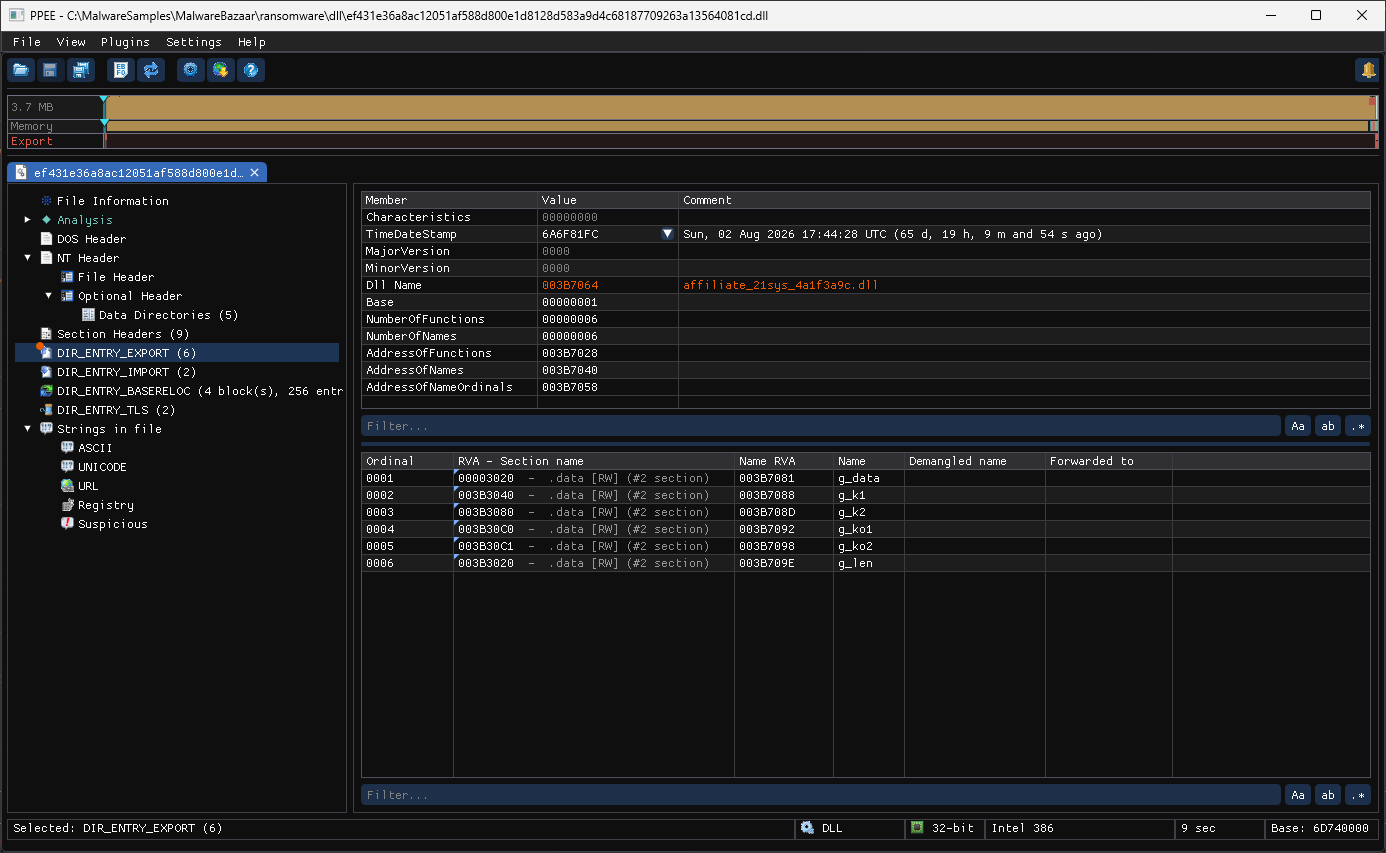
A ransomware DLL (ef431e36….dll) shows two things at a glance:
- The internal Dll Name,
affiliate_21sys_4a1f3a9c.dll, isn't the file name, so it's in the warning color. The name reads like a per-affiliate build ID. - All six "exports" point into
.data [RW], not code.g_data(at the start of.data, followed by 3.7 MB) is the embedded payload,g_lenits length, andg_k1/g_k2/g_ko1/g_ko2look like key material. A DLL that exports data like this is a container for a payload, not a library.
Reading exports like an analyst
Implant and loader entry points
A malicious DLL has to be started somehow, and its exports show how:
| Export | How it is typically started |
|---|---|
DllRegisterServer / DllUnregisterServer / DllInstall | regsvr32 /s evil.dll or regsvr32 /i /n, a classic LOLBin execution path |
ServiceMain | Loaded by svchost.exe as a service DLL |
DllGetClassObject / DllCanUnloadNow | COM hijacking (CLSID InprocServer32) |
Any name used with rundll32 evil.dll,Entry | Direct execution |
_cgo_dummy_export | The DLL was built with Go (cgo), a common implant language |
Real sample: a Go-based C2 implant DLL
$ ppee-cli --json --exports merlin.x86.dll | jq -r '.exports.name, ([.exports.functions[].name] | join(", "))'
merlin.x86.dll
DllInstall, DllRegisterServer, DllUnregisterServer, Merlin, Run, VoidFunc, _cgo_dummy_export
regsvr32, rundll32 …,Run), and _cgo_dummy_export gives away the Go toolchain. Masquerading and sideloading
Attackers often plant a DLL named after one that a signed, trusted program loads, which is DLL sideloading. The export table usually gives it away:
Real sample: a fake Windows Defender client library
$ ppee-cli --json --exports malware_with_sections.dll | jq -r '.exports.name, ([.exports.functions[].name] | join(","))'
file.exe
MpAllocMemory,MpClientUtilExportFunctions,MpConfigClose,MpConfigGetValue,…,MpFreeMemory,_cgo_dummy_export
Mp* API of Defender's mpclient.dll so a Defender binary will load it. But the internal export name is file.exe, and _cgo_dummy_export shows it is a Go build, which Microsoft's real DLL isn't. Things to compare against the genuine DLL:
- Internal name vs file name (
file.exefor a.dllis a red flag). - Export count: stubs usually export only what the host program calls.
- Which exports have real code vs stubs that just return.
- Timestamp and signature (see Security): genuine system DLLs are Microsoft-signed.
Proxy DLLs (forwarding)
A proxy DLL forwards most exports to the real library and implements only the few it wants to intercept:
Real sample: a kernel32 wrapper
$ ppee-cli --json --exports k32wrap.dll | jq '{total: .exports.numberOfFunctions,
    forwarded: ([.exports.functions[] | select(.forwarder)] | length)}'
{"total": 1302, "forwarded": 1270}
$ ppee-cli --json --exports k32wrap.dll | jq -r '.exports.functions[] | select(.forwarder | not) | .name' | head -4
ClosePseudoConsole
CreateFile2
CreateFileMappingW
CreateProcessW
kernel32. The 32 implemented ones (CreateProcessW, CreateFileMappingW, …) are exactly the functions it hooks, and they're the ones to reverse. CLI and JSON
$ ppee-cli --exports aepic.dll
Exports: AEPIC.dll (base=1, 12 function(s)):
  #1      GetAppInventoryCore rva=29CB0
  #2      UpdateSoftwareInventoryTC2 rva=4A3F0
JSON: exports → present, name, characteristics, timeDateStamp, base, numberOfFunctions, numberOfNames, functions[] (ordinal, name, and either rva or forwarder).
Hunting recipes
# Internal name different from the file name?
f=sample.dll; ppee-cli --json --exports "$f" | jq -r --arg fn "$(basename "$f")" \
  'select(.exports.present and (.exports.name | ascii_downcase) != ($fn | ascii_downcase)) | "name mismatch: \(.exports.name)"'

# Execution-related exports across a folder
for f in samples/*.dll; do
  ppee-cli --no-similarity --json --exports "$f" 2>/dev/null | jq -r --arg f "$f" '[.exports.functions[].name // empty]
    | map(select(test("^(DllRegisterServer|DllInstall|ServiceMain|DllGetClassObject)$"))) | select(length > 0) | "\($f): \(join(","))"'
done

# Proxy DLL ratio
ppee-cli --json --exports f.dll | jq '(.exports.functions | length) as $n | ([.exports.functions[] | select(.forwarder)] | length) as $fw
  | {exports: $n, forwarded: $fw, proxyLike: ($n > 0 and $fw / $n > 0.8)}'

# Ordinal-only exports (no name)
ppee-cli --json --exports f.dll | jq -r '.exports.functions[] | select(.name == null) | "#\(.ordinal) \(.rva)"'
MCP: list_exports · Related: --exports · Import directory · Security (verify the signer)
References
- Microsoft PE format specification, export data: the export directory, address, name and ordinal tables.