Base Relocation Directory
Data directory 5
IMAGE_DIRECTORY_ENTRY_BASERELOC: DataDirectory[5] in the Optional header. All data directories
What relocations are
Code and data in a PE file contain absolute addresses (pointers, vtables, jump tables) computed for the preferred OptionalHeader.ImageBase. When the loader maps the image somewhere else, which ASLR does on almost every run, each of those addresses must be adjusted by the difference between the actual and the preferred base:
The base relocation directory is the list of places that need this fix-up. It is stored as blocks, one per 4 KB page, and each block holds 2-byte entries: a 4-bit type (how wide the patch is) and a 12-bit offset inside the page.
Why it matters
An EXE without relocations can't be moved, so ASLR can't randomize it even when DYNAMIC_BASE is set. For analysts, the relocation targets are a free list of every absolute pointer in the image: vtables, function-pointer tables and string tables.
Blocks (upper list)
Linux screenshot: Base relocations: blocks above, entries below
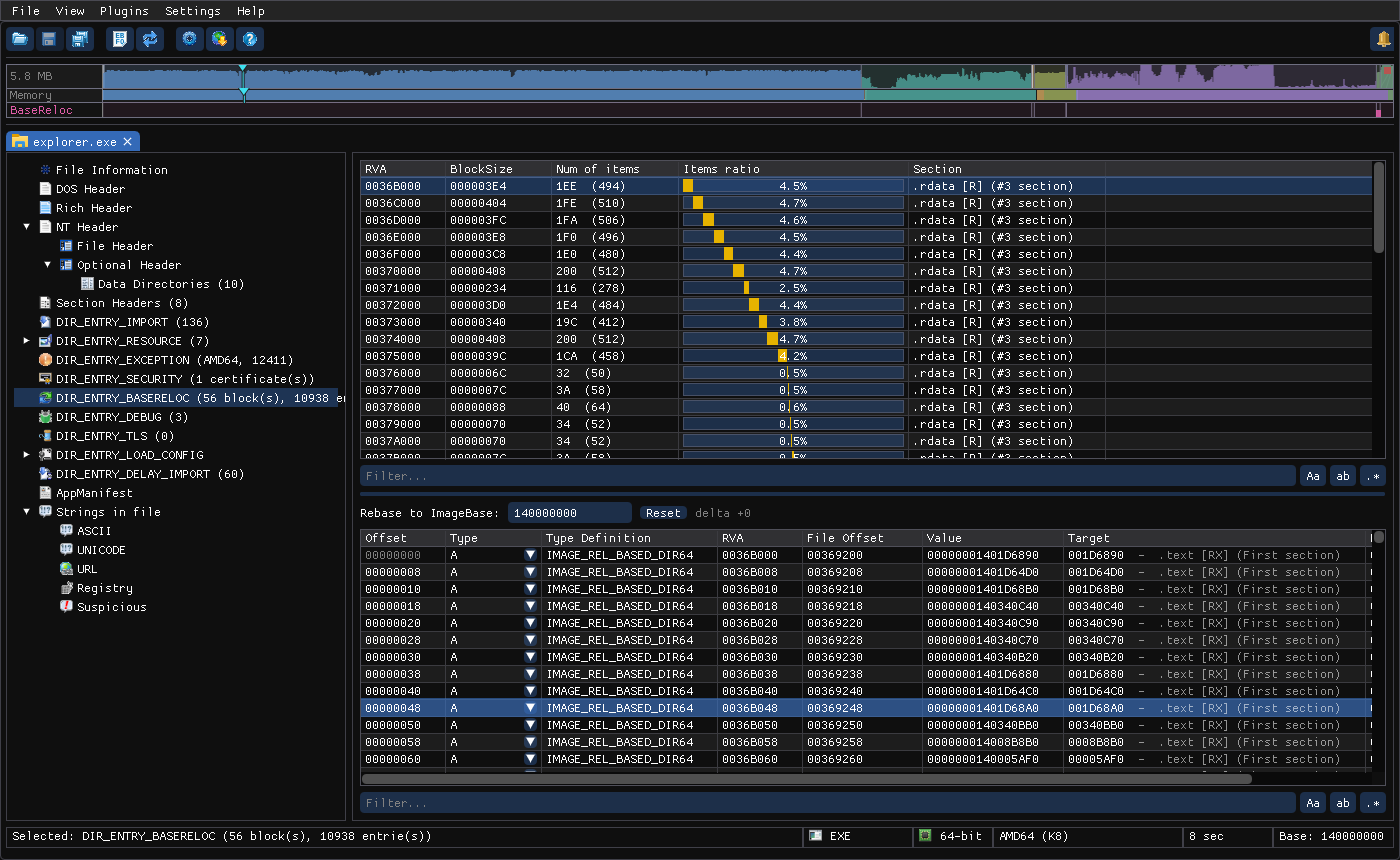
| Column | Meaning |
|---|---|
| RVA | Page RVA the block covers (editable) |
| BlockSize | Block size in bytes, including its 8-byte header (editable) |
| Num of items | Number of entries, in hex and decimal |
| Items ratio | This block's share of all entries in the directory, as a stacked bar |
| Section | The section that contains the page |
Entries (lower list)
Select a block to list its entries:
| Column | Meaning | Editable |
|---|---|---|
| Offset | 12-bit offset inside the page | ✔ |
| Type | Entry type, in hex, with a dropdown picker (see the table below) | ✔ |
| Type Definition | The type's name, for example IMAGE_REL_BASED_DIR64 | |
| RVA | Page RVA + Offset: the address that gets patched | |
| File Offset | Where those bytes are in the file. - means the RVA isn't backed by file data (for example .bss) | |
| Value | The bytes currently stored there, at the width the type patches. <not in file> / <out of file> flag broken entries. HIGHADJ also shows its (adj ….) parameter | |
| Target | For DIR64/HIGHLOW: the pointer converted back to an RVA (Value − ImageBase) and the section it points into. <outside image> means the pointer doesn't land inside the image, which is suspicious | |
| Rebased | What Value would become if the image were loaded at the base typed above the table (see Rebase preview) |
| Type | Name | Patches |
|---|---|---|
0 | ABSOLUTE | Nothing: padding to keep blocks 4-byte aligned |
1 | HIGH | High 16 bits of a 32-bit address |
2 | LOW | Low 16 bits |
3 | HIGHLOW | A full 32-bit address (PE32) |
4 | HIGHADJ | High 16 bits, rounded using the next entry as a parameter |
5, 7–9 | MIPS / ARM MOV32 / RISC-V | Instruction-encoded addresses (shown as raw bytes) |
A (10) | DIR64 | A full 64-bit address (PE32+) |
Rebase preview
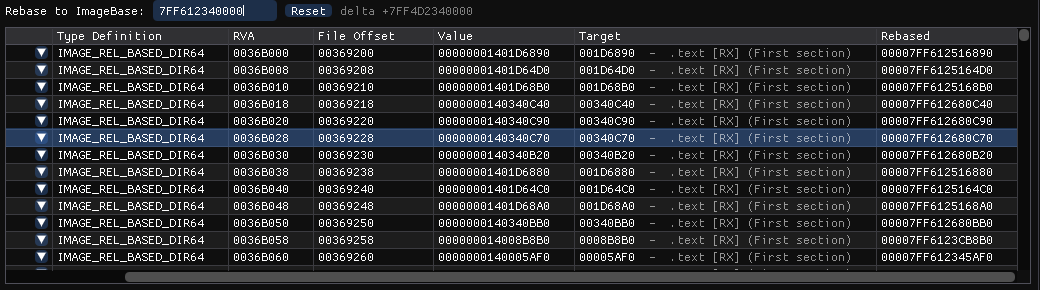
Above the entries sits Rebase to ImageBase, a read-only "what if" calculator. It never modifies the file.
Linux screenshot: Rebase preview with a new ImageBase
- Select a block in the upper list.
- Double-click the Rebase to ImageBase box and type the base address you're interested in (hex, no
0x), for example the base a debugger or crash dump reports for the module. - PPEE shows the delta next to the box (
delta +7FF4D2340000) and fills the Rebased column with each fixed-up value, using the same arithmetic as the Windows loader for each type. - Step through other blocks: the typed base is kept, so you can scan the whole table at one base.
- Reset returns to the file's own
ImageBase(delta+0, so Rebased equals Value).
In the screenshot, the module was loaded at 7FF612340000 instead of its preferred 140000000, so the stored pointer 00000001401D6890 becomes 00007FF612516890, the address you would see in memory.
Typical uses:
- Match a memory dump or debugger to the file. Enter the runtime base your debugger reports for the module and read off the runtime value of any pointer slot, then use Target to see which function or data it refers to.
- Check a manual unpack or rebuilt image. After dumping a module from memory, the stored values are already rebased. Enter the dump's base to confirm the relocations line up, or compare Rebased at the original base with Value.
- Understand ASLR behavior by comparing Value (preferred base) with Rebased (actual base).
Jump to the bytes
Hover an entry and press Ctrl+H (Follow in Hex View) to see the patched bytes in the hex view.
Relocations in malware analysis
| Observation | What it suggests |
|---|---|
No relocation directory and FileHeader.Characteristics has RELOCS_STRIPPED (0001) | Must load at its preferred base, so no ASLR. Common for small droppers and old toolchains; exploits love fixed addresses |
DYNAMIC_BASE set but no relocations | ASLR is requested but impossible for an EXE; the loader keeps the preferred base |
| A single tiny block in a large image | The protector's stub is relocatable; the real code, packed, isn't described at all (seen on an Enigma-protected EXE: 1 block) |
Targets showing <outside image> | Pointers that don't land inside the image: a memory dump taken at another base, corrupted data, or deliberately bogus entries |
| Relocation entries inside non-code, high-entropy sections | Relocated data inside what looks encrypted is worth decrypting first |
Many entries pointing into .rdata tables | vtables and function-pointer tables: good starting points for C++ reversing |
Real samples
- Two malware samples (a stealer and a packed dropper) have no relocations and the
RELOCS_STRIPPEDflag: they always load at0x400000. - A Merlin implant DLL (x86) has 1638 blocks of
HIGHLOWentries. DLLs must be relocatable, and implants that are loaded reflectively (by a custom loader instead of the Windows loader) process this table themselves. - An Enigma-protected x64 EXE has
DYNAMIC_BASEset and a single block.
Working with memory dumps
A module dumped from memory contains pointers that were already relocated to the base it was loaded at, while its header usually still says the preferred ImageBase:
- Find the base the module was loaded at, for example
7FF612340000. - Open the original file, select a relocation block, and type that base into Rebase to ImageBase. The Rebased column now shows exactly the values you should find in the dump.
- Compare them with the dump's Value column. Matching values confirm the dump is consistent; mismatches point at data the malware changed at run time (decrypted strings, patched pointers, hooks).
- To make a dump's pointers resolve in static tools, set the dump's header to the runtime base (
--set OptionalHeader.ImageBase=…): the Target column then resolves instead of showing<outside image>.
# Point a dump's header at the base it was taken from
ppee-cli --set OptionalHeader.ImageBase=00007FF612340000 --save -o dump.fixed.exe dump.exe > /dev/null
Editing relocations
- In the upper list, block RVA and BlockSize are editable.
- In the lower list, Offset is editable and Type has a picker. The change is written into the entry's 2-byte word in the file, and the RVA, Value, Target and Rebased columns update from the patched data.
- Save with Ctrl+S. Changing relocations changes how the loader patches the image, so test the result.
From the CLI:
ppee-cli --basereloc f.exe | head -3
# Does the EXE support relocation at all?
ppee-cli --json --basereloc f.exe | jq '.baseRelocations | length > 0'
# Entries per type across the whole directory
ppee-cli --json --basereloc f.exe | jq '[.baseRelocations[].entries[].type] | group_by(.) | map({type: .[0], count: length})'
The rebase preview is a GUI feature. In JSON, each entry has offset and type, and the RVA is pageRVA + offset.
# RELOCS_STRIPPED / ASLR check for a folder
for f in samples/*; do ppee-cli --no-similarity --json --headers --basereloc "$f" 2>/dev/null | jq -r --arg f "$f" '
  def h: ascii_downcase | explode | reduce .[] as $c (0; . * 16 + (if $c >= 97 then $c - 87 else $c - 48 end));
  def bit($n): (. / $n | floor) % 2 == 1;
  "\($f)\tblocks=\(.baseRelocations | length)\tstripped=\(.headers["FileHeader.Characteristics"] | h | bit(1))\taslr=\(.headers["OptionalHeader.DllCharacteristics"] | h | bit(64))"'
done
Related: --basereloc · Hardening flags · Hex View
References
- Microsoft PE format specification, base relocations: relocation blocks and types.
- /DYNAMICBASE, address space layout randomization (Microsoft): the linker option behind the DYNAMIC_BASE flag.